Escape the Coordinator’s Trap: Build Systems That Work Without You
If you lead a content team, your day likely does not start with planning and developing a content strategy. It starts with 50 unread emails, Slack messages, and 3 different spreadsheets that are all the latest version.
By the time you have finished these tasks, it’s 2:00 PM. You have spent 80% of your cognitive energy manually moving files between writers, editors, and stakeholders.
And only 20% on the high-level strategy you were hired to lead. This is the coordinator’s trap, and it is the biggest cause of burnout in the creative industry.
To survive, you must stop being a middleman. You need to build an infrastructure that automates the flow of work. Here is how to get your time back.
1. Why Manual Work Kills Content Quality
The coordinator’s trap is a deceptive cycle. When a team is small, manual coordination can feel helpful. You ping a writer a reminder, you email a file to a designer. It takes only 30 seconds. But as your team scales (or as you start creating multi-language content), those 30-second tasks add up.
When you spend your day in file management, 2 things happen:
- You lose sight of the why. You are so focused on getting a blog post published by Thursday that you do not notice that the topic no longer aligns with your company’s goals.
- You become a bottleneck. If you take a vacation, the work stops, because the system lives inside your brain.
The solution is not to work faster or overtime. You need automation.
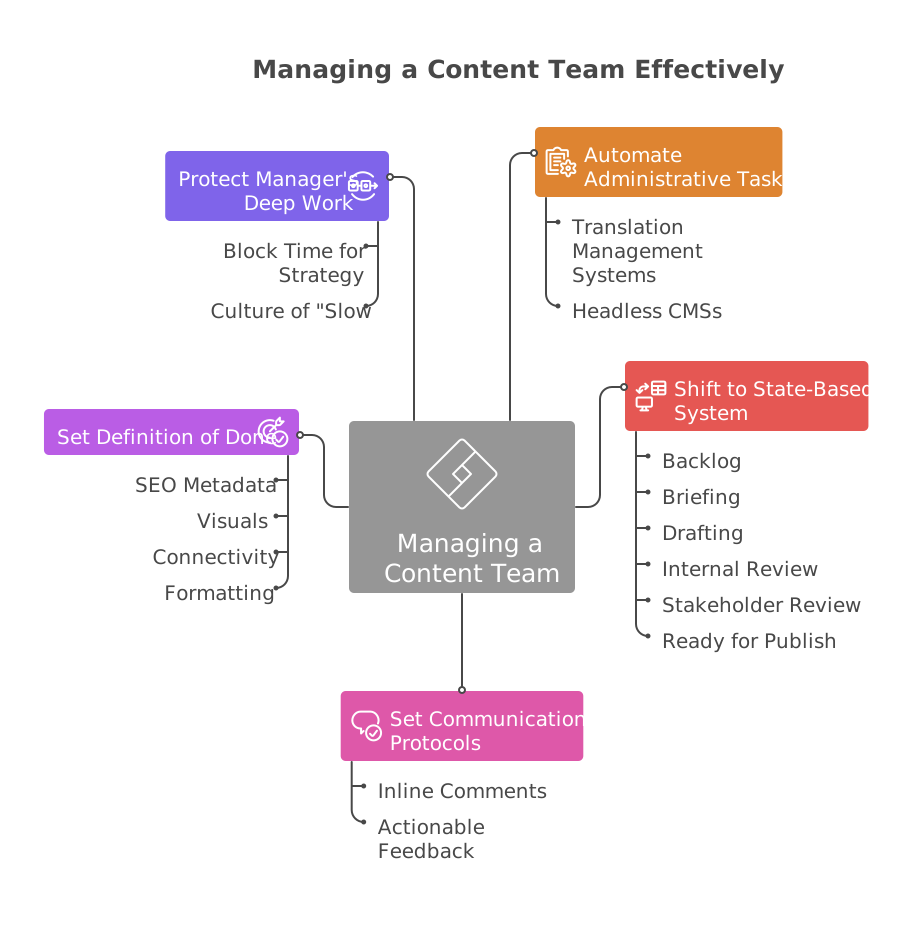
2. Automate the Administrative Tasks
The difference between a burned-out manager and a great leader often lies in their tool stack. You cannot manage complex projects in a vacuum. If you are handling international markets, for example, tasks such as exporting strings, emailing them to translators, and re-importing them into your CMS are time-consuming.
Successful teams rely on specialized infrastructure (like translation management systems for global assets or headless CMSs for multi-platform publishing) to automate these handoffs.
Why Specialized Tools Matter
A general-purpose tool like a Google Sheet is a blank canvas, but it is also a trap. It requires manual updates. A specialized system, however, uses triggers. When a writer finishes a draft, the system automatically notifies the editor. When the editor approves, the content is automatically pushed to the translation queue or the staging site.
Remove the human coordinator from these transitions to eliminate the risk of losing files. You need to stop managing tasks and start managing outcomes.
3. Shift to a State-Based System
Inbox method of management (responding to whatever is at the top of your feed) is stressful. You are constantly waiting for the next ping to tell you what to do. It makes you more reactive rather than proactive. To fix this, you must move all work into a state-based system.
Every single asset must live on a central board (Jira, Asana, ClickUp, or Monday). Follow the golden rule: if it is not on the board, it does not exist.
Task workflow may look like this:
- Backlog: Ideas that have been vetted but not yet assigned.
- Briefing: Work that is currently being scoped (no creative work allowed yet).
- Drafting: The creator is actively working.
- Internal Review: The editor is checking for voice and tone.
- Stakeholder Review: Legal, Product, or Subject Matter Experts are weighing in.
- Ready for Publish: The asset is 100% approved and formatted.
If a stakeholder asks for a quickly do something via Slack, your response should be a template: “I may lose track of that in Slack. Can you create a ticket?” This is about discipline. Moreover, it protects your team’s bandwidth and your own mental health.
4. Set Communication Protocols
Quick 15-minute sync meetings are where content productivity goes to die. For a writer or designer, an 11:00 AM meeting does not just take 15 minutes; it breaks their flow state,costing them the hour before and the hour after the meeting.
To manage a team without losing your mind, you must establish clear protocols for feedback.
Provide Inline Comments
If you are organizing a Zoom call just to walk through edits on a document, you are doubling the work. Instead:
- Feedback should happen directly within the asset (Google Doc comments, Figma annotations, or PM tool threads).
- Comments like “Make this pop” or “I don’t like this” are banned. Feedback must be actionable: “The tone here is too formal. Let’s use more contractions to align with our brand voice”.
This creates a historical record. When a content writer revisits a draft three days later, they do not have to remember what you said in a meeting.
5. Set a Definition of Done
A large portion of manager burnout comes from the ping-pong effect – sending an asset back and forth for small, avoidable mistakes. “You forgot the SEO title.” “Where’s the featured image?” “This link is broken.”
This happens because your team has different definitions of finished. You fix this by implementing a strict Definition of Done (DoD) checklist for every asset type.
Example: The Blog Post DoD
A blog post cannot be moved to “Review” until:
- SEO Metadata: Meta description and title tags are written.
- Visuals: All images have descriptive alt-text and are compressed for web speed.
- Connectivity: All internal and external links have been click-tested.
- Formatting: H1, H2, and H3 tags are correctly applied.
When the standards are objective and documented, the quality control happens before the file hits your desk. Your job changes from “correcting typos” to “evaluating the strength of the argument.”
6. Protect the Manager’s Deep Work
Most content managers view their role as a service desk – they exist to be available for everyone else. This is a mistake. To lead strategically, you need your own deep work hours.
Block Time for Strategy
Block out 90 minutes every morning (before you open Slack or email) to focus on big picture items:
- Reviewing content performance analytics.
- Adjusting the content roadmap based on upcoming product launches.
- Auditing old content for update opportunities.
The Culture of “Slow”
Normalize that not responding instantly is okay. If a question is truly an emergency, people will call you. If it is in Slack, it can usually wait 90 minutes. When you lead by example, your team feels safe doing the same. That helps to reduce the turnover and provides enough time for creative flow.
Conclusion
Great content management is not about working the longest hours. You just need to build a system that functions without your constant manual intervention.
When you stop acting as a coordinator and start investing in automated infrastructure, state-based workflows, and feedback protocols, you will see the difference. You finally may have the mental energy to answer the question that actually matters: “How do we create content that changes our industry?”
Lead the system, and let the system lead the team.